


1. Foundation
12 min
1. Foundation
Establish the content model and rendering contract
Key points
- - Why typed blocks scale better than hardcoded pages
- - How renderer mapping keeps UI consistent
- - How to structure sections for fast authoring
Learning outcomes
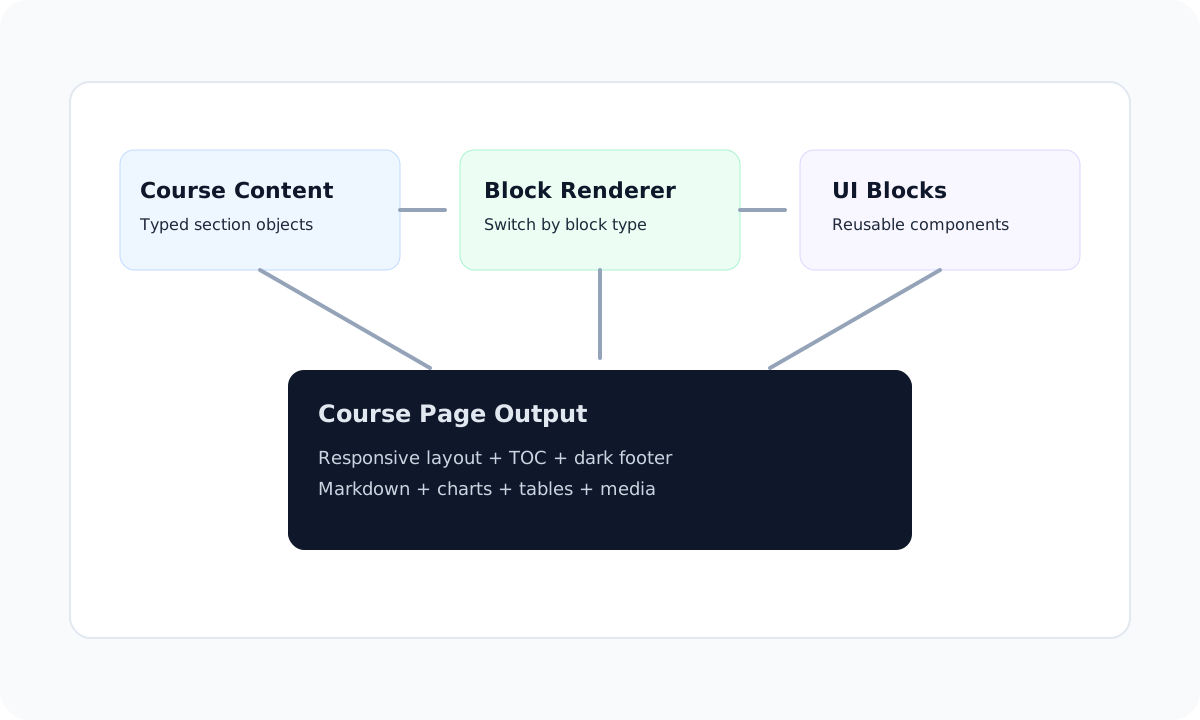
This course page is data-driven. Instead of hardcoding layouts for each lesson, we model content as typed blocks and render them through reusable components.
Learning outcomes
- Understand how section-level rendering keeps the UI predictable.
- Reuse a consistent set of blocks across all lessons.
- Scale content updates by editing one source object.
Authoring tip
Core block types used in this example
| Block | Purpose | Mobile behavior |
|---|---|---|
| Markdown | Narrative text, lists, quotes | Fluid typography |
| ResponsiveTable | Dense comparisons | Horizontal scroll wrapper |
| ChartBlock | Trend visualization | Responsive container |
2. Renderer Architecture
10 min
2. Renderer Architecture
Use a typed union to map blocks to reusable components
Key points
- - Separate authoring data from UI implementation
- - Use discriminated unions for safe rendering
- - Keep new block additions incremental
Overview 1
The block renderer isolates display logic from authoring. This lets content teams add sections quickly while UI consistency stays intact.
Block rendering flow
Block rendering flow
Mermaid syntax placeholder that can be upgraded to full runtime rendering later.
flowchart LR
  A[course content files] --> B[CoursePage]
  B --> C[ContentSection]
  C --> D[BlockRenderer]
  D --> E[Reusable block components]
Mermaid syntax block ready for runtime renderer integration.
types.ts
type CourseBlock =
  | { type: "markdown"; content: string }
  | { type: "table"; columns: TableColumn[]; rows: Row[] }
  | { type: "chart"; xKey: string; data: DataPoint[]; series: Series[] }
  | { type: "diagram"; source: string; format: "mermaid" | "text" }
  | { type: "component"; component: string; props?: Record<string, unknown> }
3. Insights and Visuals
9 min
3. Insights and Visuals
Combine data with explanatory context
Key points
- - Use chart wrappers to standardize data visuals
- - Pair visuals with concise narrative context
- - Keep media responsive and optimized
Overview 1
Below is a sample completion trend. The chart wrapper keeps chart sizing, legends, and spacing consistent across modules.
Weekly learner completion
Weekly learner completion
Example dataset for a reusable `ChartBlock` component.
Reusable blocks keep content updates fast and presentation consistent.
4. Wrap-up
6 min
4. Wrap-up
Finalize with guidance and next actions
Key points
- - Summarize implementation constraints
- - Capture deployment and validation reminders
- - Document extension strategy for new blocks
Quote
“When content is modeled as data, your course page becomes a system instead of a one-off template.”
Registry component example
5. Kapitola
100 min
5. Kapitola
Finalize with guidance and next actions
Key points
- - Summarize implementation constraints
- - Capture deployment and validation reminders
- - Document extension strategy for new blocks
Quote
“When content is modeled as data, your course page becomes a system instead of a one-off template.”